

| Q: | For which countries/states/areas can I get maps? |
| Q: | Can I use MapFling if there are no street maps for my area? |
| Q: | How is MapFling related to Google Maps? |
| Q: | How can I advertise on MapFling? |
| Q: | Can I get an integrated/custom-branded MapFling for my website? |
| Q: | Who is MapFling exactly? |
| Q: | Does Google own MapFling? |
| Q: | Who helped make MapFling possible? |
| Q: | What is MapFling? |
| A: |
MapFling is a free online service which lets you:
Each time you create a map, we give you a short MapFling Link (URL) for that map, which you paste into an e-mail, chat message, social media message, blog post, or anywhere. People who click on your MapFling Link will see your map, complete with the markers that you created. Here is a sample MapFling Link:
https://tentrr.mapfling.com/q2ri25oTo use MapFling, you don't have to log in or provide any personal information whatsoever—try it now!. You can also get access to a huge range of cool extra features, with MapFling PRO, which is described here.
|
| Q: |
What is MapFling PRO? How do MapFling and MapFling PRO compare? |
| A: |
MapFling PRO is our premium subscription that gives you a huge
range of extra features for both individial and professional users
at an amazingly low price:
MapFling PRO is a yearly subscription service that automatically renews each year, and you can cancel at any time. See the current subscription price here. We are actively adding more features to MapFling PRO so definitely contact us at info@tentrr.mapfling.com and let us know what other features you are looking for.
|
| Q: | Is there a free trial of MapFling PRO? |
| A: |
Yes! Try it right now!
|
| Q: | How can MapFling help me? |
| A: | Throwing a party? Add a MapFling Link to your invite and
everyone can see where it's at with a single click! If you're a real estate agent, blow away your customer with a custom MapFling map showing multiple properties with your customized comments. With MapFling PRO you can add your own custom logo and custom map introduction and your maps appear ad-free to your customers, and you can even include photographs of your properties and links to your website from the map introduction and from the descriptions of individual map markers. Or you can even embed a MapFling map in your own website for the most seamless and professional look. Got a house or apartment for sale or rent? Include a MapFling Link in your online ads to get an edge over the other listers. With one click, your renters will know where you are. Customers flying in to visit your office? Impress them with a MapFling map that shows your office, their hotel, and maybe a few of your favorite restaurants too! Label each location with whatever description you want to include ("Excellent sushi here!"). BUY PRO to add your custom branding with a professional ad-free experience for your customers. Meeting a friend at Central Park? It's a big place: with a MapFling satellite image, you can pinpoint the exact park bench where you'll be waiting for her! Any time you find yourself sending a paper map old-fashioned-style, or copying a huge awkward Google Maps link that leaves your recipient confused due to the lack of labels, you can fling it instead! They will receive your map instantly, complete with your markers and comments. They will be able to zoom in and out on the map, explore the area, share the map with others, and print if they like. With MapFling PRO you can even edit maps while keeping the same MapFling Link. Multiple people can collaborate on real estate searches, travel plans, party arrangement, or even scavenger hunts! The possibilities are endless!
|
| Q: |
Can I use MapFling on my mobile phone? Can I use MapFling on my tablet? Can I use MapFling on my laptop/desktop computer? |
| A: | Yes! MapFling works on both desktop/laptop computers (e.g. Windows, Mac)
and also mobile phones and tablets (e.g. iOS, Android).
You can even create and fling maps on mobile devices.
|
| Q: | How is MapFling different from other services? |
| A: | Unlike other services, MapFling:
|
| Q: | Does MapFling cost money? |
| A: | No! MapFling is a completely free service,
supported by the advertising that you see next to the maps. MapFling PRO gives you a ton of extra features and turns off the ads for both you and those viewing your maps.
|
| Q: |
Can I cancel my MapFling PRO subscription? What is the refund policy for MapFling PRO? Do you offer a money-back guarantee for MapFling PRO? |
| A: |
On your PROFILE page you can cancel renewal of your MapFling PRO
account at any time. You will continue to have all the
MapFling PRO features until you reach the subscription expiration
date shown on the PROFILE page. We offer a free trial mode (TRY PRO now) that lets you play with many of the MapFling PRO features before you buy. If you have already puchased MapFling PRO and you have any issue that is due to a bug in our service or a feature that does not behave as we explain on tentrr.MapFling.com or in this FAQ, we are happy to refund all of your MapFling PRO payment for the most recent year, and we are very liberal and generous about such cases. Otherwise, if you have actually been subscribed with no issues, there are no refunds. In particular, we do not offer pro-rata refunds if you decide to stop using the service mid-year. As a practical matter, the cost of MapFling PRO is so minimal that it hardly matters. We have reduced the cost to the bare minimum needed to keep operating our service. Because there are many fixed costs associated with our service, we could not continue to provide service if customers only pay for fractions of years (or, we would have to charge higher prices per week/month, which makes billing very burdensome for us and our customers). We prefer to keep it simple!
|


 ...)
...)
| Q: | How do I begin? |
| A: | To begin, visit tentrr.MapFling.com, type an address in the
box under step 1, and then click the GO
button. In the address, you should provide at least the city, as in these examples: new york, nyHowever, for most countries, if you provide a specific street address with street numbers and ideally postal codes, like this: 1600 Pennsylvania Avenue NW Washington, DC 20500then we can pinpoint the exact location of your address and mark it on the map for you. That's usually the best way to start. The few areas of the world for which Google does not yet have street maps have very detailed satellite images. So you can find the city by typing in its name. Then, click the "Satellite" button at the top right of the map. Now you can zoom in on a precise point in the city and place one or more markers. You can also just start by zooming into the map and clicking/double-tapping where you want your first marker. If you don't see the map yet in step 1, click the link that says "add first marker right on the map." If you have MapFling PRO, you can also click/tap "Use current location" to create a new marker at your device's current physical location. MapFling will attempt to find a street address for your current location too.
|
| Q: |
How do I share my MapFling map with others? How do I copy and paste the MapFling Link? |
| A: |
When you have finished creating your MapFling map and you go on to
step 3, our service
gives you a MapFling Link, which looks something like this:
https://tentrr.mapfling.com/q2ri25oNow your goal is to send that MapFling Link out. The easiest way is to use one of the convenient sharing buttons we provide in step 3 (Email, Facebook, Twiter, Reddit, Pinterest). These buttons create a new, blank message in the relevant app that already includes your MapFling Link. If the app you want to use is not on the list, use the button labeled "Copy." When you push that button, we will copy your MapFling Link into your clipboard. Now you can head over to any app (chat app, email app, social media app, document/spreadsheet app, anything) and paste the MapFling Link. When others read your message, your MapFling Link will look something like this: https://tentrr.mapfling.com/q2ri25oThey will be able to click/tap on your MapFling Link. When they do, they will see your MapFling map, complete with the markers and descriptions you created. Try the sample link above!
|
| Q: |
Can I put a MapFling map in a page of my own website? Do you support iframes or embed tabs? |
| A: |
Yes! If you are using MapFling PRO, then you can embed your MapFling map
right in the middle of a page of your own website, rather than
requiring your map viewer to click a MapFling Link that you provide so
they can see the map on tentrr.MapFling.com. The map will be fully interactive just as if your viewer were looking at it on tentrr.MapFling.com: your viewer can pan and zoom and explore markers. Your map will be read-only, so your viewer cannot change the map. You can see an example of embedding here. Embedded maps like this can create a more seamless experience and allow for cleaner branding too. Embedding works using the standard web technology known as "iframes." You don't have to understand HTML coding in detail, because MapFling can automatically generate the necessary HTML code for you. In step 3, where you get your MapFling Link, click "See How" where it says "you can also embed this map into your own web pages." Some HTML code will appear. Copy and paste this HTML code into your own website. The exact steps needed to insert the code in your web page depend on which tool you are using to create your website. Most website design tools have a feature that lets you insert some "raw HTML" at a given point in your page. Before you copy the code, you can also customize how the embedded map will appear. The code will change as you customize:
A note on security: while nobody else can modify your MapFling map, it is possible for someone else to embed your map into a page of their website. To do this, all they need to know is your map's MapFling Link (and if they visit a page of your website where the map is embedded, they can figure out your MapFling Link). There is no practical way to prevent this, in the same way that there is no practical way to prevent others from publishing your MapFling Link once they know it. If it is important for you to always assert your authorship of the map, consider identifying yourself in the map introduction text that you enter in step 2. That way, if someone publishes your MapFling Link or embeds your map in their website, the map will still show your identity at the very top above the marker list, so people will know that you created the map. This might be a good place for a copyright notice too.
|
| Q: | For how long can I use my MapFling Link? Does it expire? |
| A: | Here's how it works:
If nobody has looked at a particular MapFling map for 3 months, then it might expire, in which case all information in it (map position, markers, descriptions) will be lost. Might last longer: As mentioned above, your map may actually last longer than 3 months since it was created or last viewed. In practice we try to keep maps alive as long as possible given our available storage, but for you the figure that matters is our guarantee above. Do not assume maps expire: Do not use MapFling if you require that map to expire at any particular time. There is no way to predict ahead of time how soon it will expire. And, as we mentioned in our answer about privacy, MapFling does not use passwords for map access, so you should never create any map that contains sensitive information that you wouldn't want someone else guessing just as someone might guess at a telephone number. Currently, if you are using the free MapFling service, there is no way to explicity delete a map, again because MapFling keeps things simple by avoiding the use of passwords. If you are using MapFling PRO then you can delete any of your maps at any time. Note on policy changes: In the unlikely event that we decide to change our policy in a way that might make your old map expire sooner, we will
So, as long as you check your email from MapFling (if you have MapFling PRO) or view your maps at least once every 3 months (if you do not have MapFling PRO), you are guaranteed to be notified of the policy change and you can take any steps you need to save your data. |
| Q: | My MapFling Link didn't work. Why? |
| A: | If you are reading this, it probably means that you clicked on, or
typed in, a MapFling Link and you were directed here instead of seeing
your map. There could be several reasons why your MapFling Link might not have worked:
|
| Q: | Can I enter latitude/longitude (GPS coordinates) directly? |
| A: | Yes. In the field where you would normally type a street address to
add a new marker, just type the latitude, a comma, and then the
longitude. For example,
MapFling will even try to find the nearest street address at your specified location (this is called "reverse geocoding") and offer you one or more choices to use in your marker description.
|
| Q: | Can I get driving/transport directions with MapFling? |
| A: |
Yes. When you are viewing a completed MapFling map, use the  button that you see to the
right of your desired marker description
to open that location in Google Maps.
From Google Maps you can request directions to or from that
location. button that you see to the
right of your desired marker description
to open that location in Google Maps.
From Google Maps you can request directions to or from that
location.
|
| Q: | How can I print the map I made with with MapFling? |
| A: |
MapFling itself doesn't have a specific button for printing, but you can
print the map nicely using your web browser. Generally, you will want
to fit the map on one printed page, and for that you need a modern
browser (not the inferior Internet Explorer 6 browser that comes with
Windows XP) that supports a "zoom" function when printing. For
example, in the Firefox web browser,
before you print, go to "File...Page Setup" and in the "Format and
Page Options tab" try different values of "Scale" until it looks right
on the printed page (or, if available, try "Shrink to fit Page
Width"). In many browsers there is a "File...Print Preview" option
that you can use to check your settings before you waste any paper.
|
| Q: | How can I print the markers I made with with MapFling? |
| A: |
MapFling itself doesn't have a specific button for printing the map
markers, but we are considering adding such a button for maps that
have a large number of markers. In the meantime, here are some hints that may get you close enough if you have a lot of markers:
|
| Q: | How many markers can I have? |
| A: |
In the free version of our service, one map can use up to
15 markers. In MapFling PRO, one map can have up to a whopping 801 markers (A-Z then 1-99 then AA-ZZ)!
|
| Q: | Can I change the marker colors? |
| A: |
Yes! Just click/tap the  icon that appears to the
right of your marker description in step 2.
icon that appears to the
right of your marker description in step 2.When you create a new marker, we use the last color you chose, so you only have to choose a color once to use it for many markers.
|
| Q: |
Can I change the marker shape? What marker shapes are available? Can I get new shapes not yet included in the list? |
| A: |
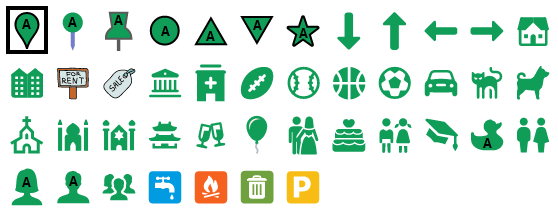
Yes! The free version of MapFling just has one marker shape
but in MapFling PRO you can choose from a wide palette of custom marker shapes, such as these:
Just click/tap the When you create a new marker, we use the last shape you chose, so you only have to choose a shape once to use it for many markers. Gallery If your desired shape is not currently shown in the shape menu, you can actually choose from literaly thousands of shapes in our gallery and we can add the shape to MapFling for you. Currently we have a licensing agreement with the graphics company called Icons8, and our gallery includes their full catalog! So, visit:
https://icons8.com/iconsand choose your desired marker shape by browsing Icons8 or using their handy keyword search. Remember that marker shapes have to remain legible over a wide variety of possible backgrounds (e.g. blue ocean, green/grey land, with possible text or road lines behind them). So not all icons from Icons8 make reasonable marker shapes. It is best to choose a marker shape that has a large filled area and a thick line border. And ideally, the shape should also have a nice big space for the marker label (e.g. 1-99, A-Z), but we can also take submissions for marker shapes that do not easily accomodate a label. When you have found the shape you want:
|
| Q: |
Can I change the marker labels (A-Z, 0-99)? Can I remove the marker labels? |
| A: |
Yes! In MapFling PRO, you can choose whether markers are labeled A-Z
or 0-99 and you can even remove the marker labels entirely if you
like, or only label markers whose marker shape has
a clear, open space for a label
and leave the more pictorial markers unlabled.
|
| Q: |
Is there a limit to the map introduction length (MapFling PRO)? Is there a limit to the marker description length? |
| A: |
None that we are currently aware of, although it is possible certain
versions of certain web browsers may impose limits.
|
| Q: |
Can my map introduction have multiple lines (MapFling PRO)? Can my marker descriptions have multiple lines? Can I use line breaks or blank lines in my text? |
| A: |
Yes, the enter/return key works in the boxes for your map introduction
and marker descriptions
on both laptop/desktop and mobile devices. On some mobile devices, your
keyboard might not have an enter/return key, or there may be a
configuration option to show the enter/return key on your keyboard.
Google the name of your keyboard or device and "keyboard enter key."
|
| Q: |
Can my map introduction have clickable links? Can my marker descriptions have clickable links? |
| A: |
Yes! In MapFling PRO, follow this model
in your map introduction or in a marker description:
[link=https://myrealestate.com]Visit our website[/link]and your viewers will see a clickable link like:
that they can click to reach the website
Breaking that down piece by piece:
|
| Q: |
Can my map introduction have images/photographs/pictures? Can my marker descriptions have images/photographs/pictures? |
| A: |
Yes! In MapFling PRO, follow this model
in your map introduction or in a marker description:
[img=https://mywebsite.com/myimage.jpg]and your viewers will see the image you specified at that point in your text. Breaking that down piece by piece:
If you do not yet have a URL (link) for your image, then upload your image to an image hosting site like tinypic and use the URL/link that the hosting site gives you in MapFling. MapFling will scale down whatever image you provide (if necessary) so that it fits inside the column where your map introduction or marker description appears. If you have a large number of images in your map and those images are very large, it is best to scale your image down on your server (or on the image hosting site) to roughly 600 pixels wide so that your maps will load more quickly for your viewers.
|
| Q: |
Can I modify/edit/change my own maps? Can multiple people collaborate on one map? |
| A: |
See this question in the Privacy section.
|
| Q: | Can I import/export GIS/GPS data files with MapFling? |
| A: |
Not currently. We are considering adding an import feature to
MapFling PRO. If you are interested in this, definitely
let us know at info@tentrr.mapfling.com what format you want to import, and
ideally send us a little sample data, so we can make sure to
implement the format you need. There are literally hundreds
of different GIS/GPS data formats.
|
| Q: | What changed recently in MapFling? |
| A: |
The most recent release of MapFling added MapFling PRO with
a huge range of new features.
|
| Q: | Can you add a certain feature to MapFling? |
| A: |
We always love to hear how people are using MapFling and to hear
your suggestions for new features. You can send feature requests
to info@tentrr.mapfling.com and we will
implement the features that are most requested.
|
 icon
that appears to the right of your marker description in step 2 to
choose a marker shape.
icon
that appears to the right of your marker description in step 2 to
choose a marker shape.
| Q: | How can I advertise on MapFling? |
| A: | Currently, we use Google for our advertising. To place your ad on our
website, click
here. If there is a good business case, we might also consider ad exchanges with high-profile sites and quantity advertising deals that do not involve Google. If you are interested in this, contact advertising@tentrr.mapfling.com.
|
| Q: | Can I get an integrated/custom-branded MapFling for my website? |
| A: | Yes! Imagine having the easy-to-use interface and all the
functionality of MapFling integrated directly into your site or online
service with your own site's branding. Leap ahead of your competition
with technology like this:
|
| Q: | Does MapFling collect my personal information? |
| A: |
For the Free MapFling MapFling does not collect any personal information about you whatsoever. When you visit our site, you immediately use our service without the need to log in, provide your name, email address, or any other information. We then give you a MapFling Link which you share with others by your own means (for example, by emailing the MapFling Link to them). MapFling has the same information about you as all general sites on the internet, such as your IP address. MapFling uses cookies to store your preferred marker color so that you can easily make many markers with the same color, and to store the most recent set of edits you made to your map (so you can undo your edits). MapFling uses Google Ads (Google's AdSense system), and you can click the info button on the ads to read Google's privacy policy. For MapFling PRO MapFling PRO is a subscription service that allows you to log in to manage, edit/modify, or delete any map you created at any time. You log in using your email address and a password that you choose. No Spam: we send email only for billing issues, price changes, password reminders, and important site policy changes that might affect your maps (such as changes to map expiration time). We send email about new MapFling features if, and only if, you check the box to receive such emails when you create your account, and you can always opt in or out of those feature emails on your PROFILE page. We never sell your email. During your purchase and while you are using the service, your credit card number is handled using the latest security technology and is never stored on MapFling servers. During your purchase, your web browser passes your credit card number directly to our online payment processor over a secure channel. The only information about your credit card to which MapFling has access is the last four digits of the credit card number, so that we can show it to you for your convenience on your PROFILE page to remind you which card is being used for the yearly subscription renewal.
|
| Q: |
Are my maps private? Can other people see/view my maps? |
| A: |
Once you have created a map, anyone can look at your map if they have
(or can guess) your MapFling Link. Although it is not particularly easy
to guess a MapFling Link (it's about like guessing someone's telephone
number), you must understand that MapFling is designed as an open system
for non-secret data. For example, if you guess at a random MapFling Link
and type it in, you can look at someone else's map, in the same way
that if you dial some random digits on your telephone, you will
reach someone else's phone. The chances of someone guessing a MapFling Link correctly are about 1 in 1 billion, but they are not zero. None of the information in your map (such as the map position, marker positions, marker descriptions, etc.) is protected from viewing in any way. For example, there is no password to view the map (not even if the creator of the map has MapFling PRO). Do not use MapFling to store any type of sensitive data; we take no responsibility for any exposure of your data to anyone. Furthermore, you are explicitly forbidden from using MapFling for any illegal purpose. There is one small exception to this. It only applies to MapFling PRO and it only applies to the box in step 2 labeled "Private map name." The text you type there is never shown to any viewers, even if they have the MapFling Link of your map. That text is only shown in your MY MAPS screen to help you find the map in your map list. Only people who have your MapFling username and password will be able to see that text.
|
| Q: |
Can I modify/edit/change my own maps? Can other people modify/edit/change my maps? Can multiple people collaborate on one map? |
| A: |
For the Free MapFling Nobody, not even you, can modify/edit/change or delete a MapFling map once it has been created. You and others can create other maps starting with the information on your map, but those "customized" maps will have a different MapFling Link from your original map. For MapFling PRO You can manage, edit/modify/change, or delete any map you created at any time on your MY MAPS screen. That means you can change the information in one of your maps (such as the map position, marker positions, marker descriptions, etc.) without changing that map's MapFling Link. This is very useful when you need to change your maps without having to distribute new MapFling Links to your viewers. It's also useful when multiple people want to collaborate on a single map: in that case, the group of collaborators log into MapFling using the same MapFling PRO email and password (the email address could be that of one of the members of the group, or it could be an email address shared by two or more members of the group: both methods work just fine). In general, and especially in the case of collaboration, it is important to choose a MapFling PRO password that is not the same as any of the collaborators' other passwords for other services such as email or social media. It is good security practice in general to use different passwords on all services/accounts. When multiple people collaborate on a single map, it is important that only one person is making changes at a given moment. The other users can wait for the current modifier to finish making changes and then they can reload the map to see the latest changes. That way, there is no risk of one collaborator starting with an older version of the map (one without the latest changes), making changes, and saving the map, potentially causing another collaborator's changes to be lost. As with users of the free MapFling, MapFling PRO users cannot edit/modify or delete maps created by any other MapFling PRO user or by people who used the free MapFling, and nobody can edit/modify or delete your maps.
|
| Q: | Who is MapFling exactly? |
| A: | MapFling Incorporated is headquartered in Menlo Park, California, USA. We develop a number of interactive web services. Email us at info@tentrr.mapfling.com for more information. |
| Q: | Does Google own MapFling? |
| A: | Nope. Although we use Google's excellent map service,
MapFling is in no way affiliated with Google.
|
| Q: | Who helped make MapFling possible? |
| A: |
MapFling uses Google's excellent map service. MapFling also uses an SVG marker image graciously provided by Magicon from the Noun Project under a Creative Commons license.
|